
Description
Schneider Electric Magelis XBTF024610 10.4″ Color Graphic Operator Terminal, Keypad HMI, XBT-F Series, Discontinued
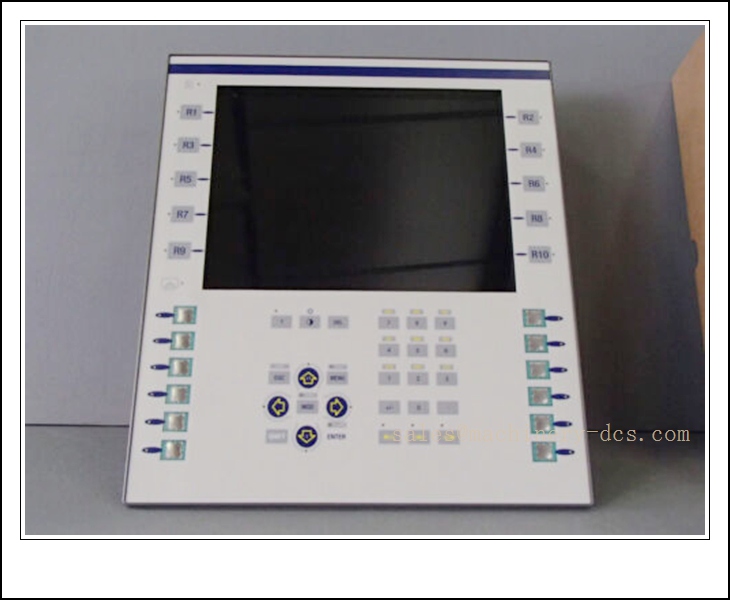
XBTF024610
Technical Specifications
- Catalog Number: XBTF024610
- Brand: Schneider Electric (Telemecanique)
- Series: Magelis XBT-F
- Display: 10.4 inch color LCD
- Resolution: 640 × 480 (VGA)
- Operation Interface: Integrated hard membrane keypad (no touchscreen)
- Programming Software: XBT L1000 configuration software
- Storage: PCMCIA memory card for project storage and backup
- Communication Ports: Ethernet TCP/IP, serial ports (RS232 / RS485)
- Protocols: Modbus, Uni-Telway, FIPWAY and other Schneider PLC protocols
- Supply Voltage: 24 VDC
- Front Panel Rating: IP65 / NEMA 4 for panel-face installation
- Mounting: Panel cutout mount
- Operating Temperature: 0 °C ~ +50 °C
- Humidity: 10%–90% RH, non‑condensing
- Lifecycle Status: Discontinued (End of Sale: Sep 05, 2022)
- Certifications: CE, UL, CSA, Class I Div 2
- Country of Origin: France
Key Features & Advantages
- 10.4” color keypad-only HMI: Robust physical keypad design suited for heavy industrial environments where touch operation is unreliable.
- IP65 front panel: Resists dust, splashing water and coolant on machine front panels.
- Multi-protocol connectivity: Native connection to Modicon, Premium, M340 and legacy Schneider PLC platforms.
- Ethernet TCP/IP built-in: Supports networking of multiple HMIs and remote supervisory access.
- PCMCIA card support: Convenient project backup, restore and on-site program transfer without PC connection.
- Long-life membrane keys: Engineered for frequent, repetitive operator input in production lines.
- Proven legacy Magelis platform: Stable runtime for established machine automation and process skid retrofits.
- Class I Div 2 approval: Suitable for non-incendive hazardous auxiliary control panels.
Application Fields
- Packaging machinery, textile machines and metalworking machine tools
- Automotive assembly stations and production test rigs
- Food & beverage processing lines
- Water treatment and pumping station control
- General factory automation with Modicon PLC control
- Building infrastructure and HVAC supervisory panels
- Retrofit projects for existing XBT-F installed base
Related Product Recommendations
- XBTF024510: 10.4” monochrome keypad HMI (same form factor)
- XBTF024310: 7.5” color keypad HMI
- HMIGK5310: Modern replacement HMI (Magelis GK series, Vijeo Designer)
- HMIGTO5310: 10.4” color touchscreen HMI for upgrade
- XBTZG935: Programming cable for XBT-F series
- XBTZGPCM: PCMCIA memory card for XBT-F
- HMISTU655: Compact 7” color HMI alternative
- HMIDT732: High-performance 10” advanced HMI
- XBTF024110: 5.7” small color keypad terminal
- XBTGT5330: Legacy Magelis GT touchscreen HMI
Installation & Maintenance
Installation
- Prepare the standard XBT-F panel cutout and insert the unit from the front; secure with supplied mounting clips evenly.
- Maintain gasket integrity to preserve IP65 rating; inspect gasket before installation and replace if damaged.
- Route 24 VDC power cable separately from high-voltage power and VFD cables to reduce electrical noise.
- Terminate Ethernet and serial communication cables following EIA RS485 guidelines; fit bus terminators at trunk ends.
- Set station address and communication protocol matching the connected PLC in XBT L1000 software before commissioning.
- Do not mount in direct sunlight; avoid locations with excessive vibration, chemical spray or rapid temperature cycling.
- Verify front panel seal after installation to prevent liquid ingress.
Maintenance
- Inspect membrane keypad, front overlay and gasket during routine shutdowns for cracks, wear and discoloration.
- Keep front panel clean with mild non-abrasive cleaners; avoid solvents that degrade the membrane and seal.
- Back up application projects to PCMCIA card and PC files regularly for spare recovery.
- Check communication status and tag quality on HMI screens to diagnose wiring, termination or PLC mapping faults.
- Since this model is discontinued, maintain spare units or spare membrane keypad overlays for critical machines.
- If replacement is required for upgrade to HMIGK series, the project must be converted manually in Vijeo Designer.
- Keep original program files, communication drawings and PLC register mapping records for asset support.

 Send an Email