
Description
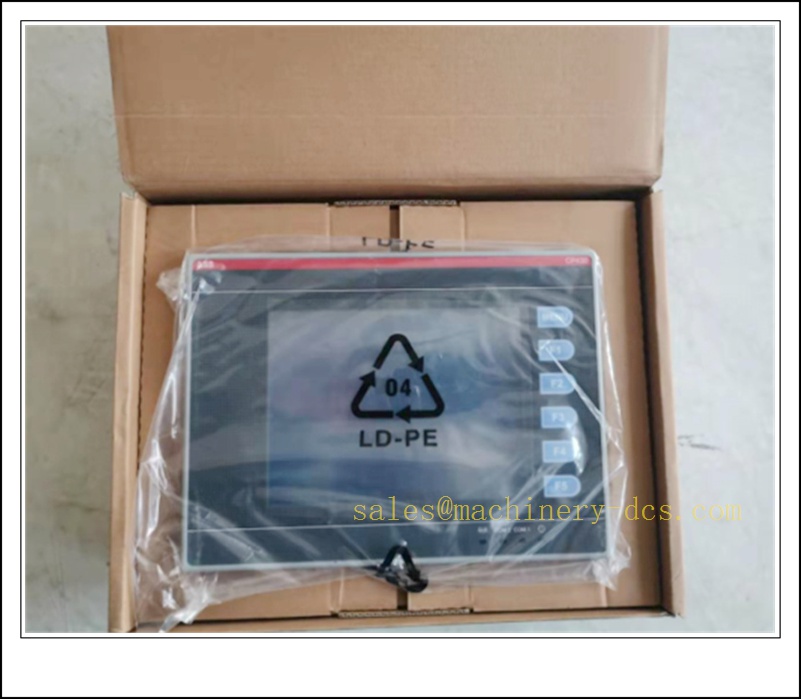
ABB CP430BP-ETH 1SBP260194R1001 5.7” STN Touch Control Panel with Ethernet for Procontic CS31
Model & Part Number
- Type: CP430BP-ETH
- Order Code: 1SBP260194R1001
- Manufacturer: ABB
- Product Category: HMI / Operator Control Panel
- Series: CP400 Control Panel Family
- Compatible System: ABB Procontic CS31, CP430BP Processor
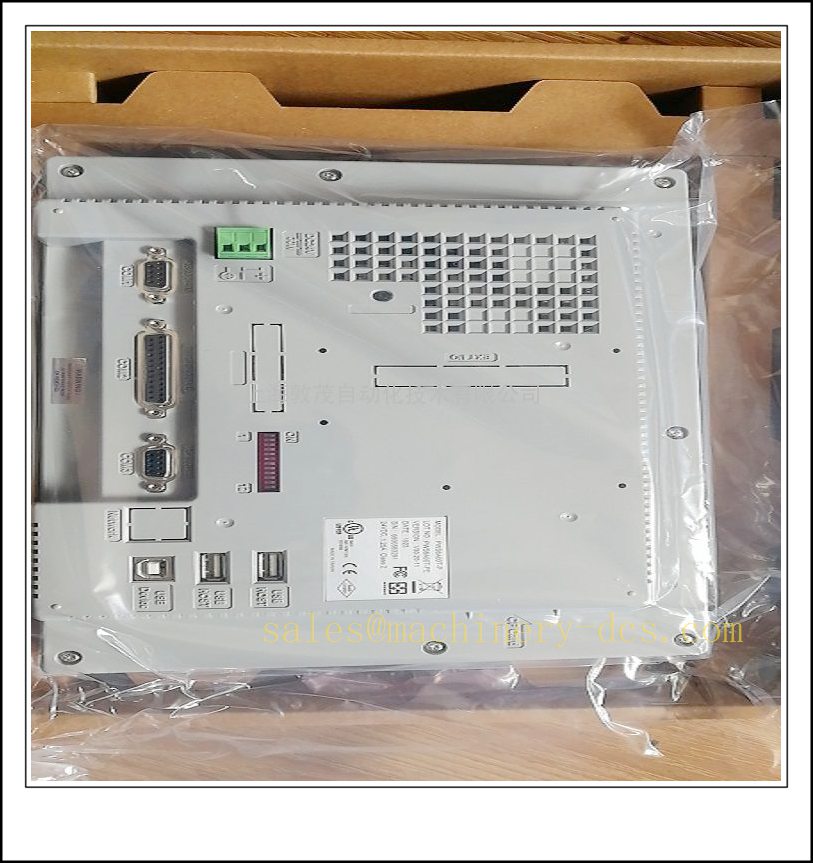
CP430BP-ETH 1SBP260194R1001
Product Description
The CP430BP-ETH (1SBP260194R1001) is an Ethernet-enabled 5.7-inch industrial operator panel from ABB CP400 series, designed as the native local HMI for Procontic CS31 automation system. It adopts monochrome STN touch display combined with one menu key plus five freely assignable function keys. Compared with standard CP430BP, this ETH variant integrates built-in Ethernet port for remote networking, data upload and SCADA communication besides serial interfaces. It supports process monitoring, manual operation, alarm viewing, recipe management and fault diagnosis. This unit is end-of-production, and most global demand comes as spare replacement for existing CS31 installations in water treatment, pumping stations and general machinery automation.
Technical Specifications
| Item | Specification |
|---|---|
| Display | 5.7” STN Monochrome, 16 blue-grey levels, 320 × 240 resolution, CCFL backlight |
| Touch Type | 4-wire resistive touchscreen |
| Keypad | 1 menu key + 5 configurable function keys F1–F5 |
| CPU | 32-bit RISC processor |
| Memory | Flash 4 MB, RAM 16 MB, backup RAM 512 KB |
| Real-Time Clock | RTC with rechargeable lithium backup battery |
| Communication | 10 Mbps Ethernet; COM1 RS232/RS485 (9-pin); COM2 RS232/RS422/RS485 (25-pin) |
| Power Supply | 24 VDC, 19.2 ~ 30 VDC |
| Front Protection | IP65 |
| Rear Protection | IP20 |
| Operating Temperature | 0°C ~ +50°C |
| Storage Temperature | -10°C ~ +60°C |
| Relative Humidity | 5% ~ 85%, non-condensing |
| Net Weight | Approx. 0.81 kg |
| Compliance | CE, cUL certified |
Application Fields
- Water supply and wastewater treatment plants
- Pumping stations and pipeline control systems
- HVAC and building central control
- Conveyor and material handling lines
- Food & beverage process skids
- Light chemical and pharmaceutical auxiliary control
- Tunnel ventilation and drainage control
- Legacy Procontic CS31 system maintenance & life extension
Brand Profile (ABB CP400 Series)
ABB CP400 control panel family was developed as matched operator interface for Procontic CS31 distributed automation platform. The CP430BP-ETH is the Ethernet upgraded version of , offering richer networking capability for remote monitoring. The CP400 range was widely adopted for compact, stable, low-maintenance industrial sites. ABB has stopped production of CP400 panels and recommends CP600 series as migration replacement, while continuing limited support for spare sourcing for legacy installed base.
Related News & Industry Events
-ETH belongs to the obsolete HMI line. Original ABB production has ceased, and stock availability of original new units is very limited. Water utilities and municipal pumping plants keep tested spare -ETH panels on inventory to avoid HMI failure and station blackout. End users normally arrange phased migration to ABB CP600 HMI during scheduled overhaul, while maintaining spare pool for emergency swap-out in transition period. Tested surplus and rhed are hot-selling items in industrial aftermarket for system owners.
Usage Scenarios
- Local on-site operator interface paired with processor
- Remote monitoring and data transmission via Ethernet to central SCADA
- Real-time process value display, setpoint adjustment and manual valve/pump operation
- Alarm list browsing, fault acknowledgement and event logging
- Recipe storage, recall and batch parameter management
- Diagnostics for bus network and I/O module status
- Direct replacement led panel during plant shutdown
- Multi-station networking for distributed pumping groups
Functional Advantages
- Integrated Ethernet port, extra networking option compared with standard model
- Dual operation mode: resistive touch + physical function keys, reliable under vibration
- IP65 front panel rating, suitable for cabinet front exposed to dust and splash
- Multiple serial ports compatible with bus, Modbus and other legacy protocols
- Built-in RTC with battery backup to preserve time stamp after power loss
- Compact panel cutout size, easy retrofit on existing cabinet
- Optimized runtime for system, stable communication with CPU
- Long service track record in water and municipal automation
- Supports project backup and restore via serial and Ethernet download
Recommended Related Products (16 pcs)
- ABB 1SBP260192R1001 Control Panel
- ABB CP430T 1SBP260195R1001 HMI
- ABB CP430T-ETH 1SBP260196R1001 Operator Panel
- ABB CP420B 1SBP260182R1001 Panel
- ABB CP450T-ETH 1SBP260189R1001 HMI
- ABB 1SBP260192R1001 Processor
- ABB DI401 1SBP260010R1001 Digital Input
- ABB DO401 1SBP260020R1001 Digital Output
- ABB AI401 1SBP260030R1001 Analog Input
- ABB AO401 1SBP260040R1001 Analog Output
- ABB SU401 1SBP260060R1001 Power Supply
- ABB RS401 1SBP260080R1001 Bus Repeater
- ABB BT401 1SBP260070R1001 Bus Terminal
- ABB CP630 CP600 HMI (Migration replacement)
- ABB CP620 CP600 Operator Panel
- ABB TK401 Programming Cable
Installation Instruction
- Disconnect 24 VDC power before installation.
- Verify cabinet front cutout dimension matches – drawings; clean sealing surface.
- Insert panel from cabinet front, place rubber sealing gasket evenly.
- Tighten rear mounting clamps diagonally; avoid over-tightening to prevent housing deformation.
- Wire 24 VDC power to rear terminal, strictly follow polarity.
- Connect Ethernet cable and serial communication cables; use shielded twisted pair for serial bus wiring.
- Set IP address and serial parameters according to network drawing.
- Power on the panel and check boot status LEDs.
- Download HMI project via Ethernet or serial port, configure communication link to processor.
- Verify tag reading, alarm display and manual control output function.
- Test touch response and all F1-F5 function keys, calibrate touchscreen if offset appears.
- Confirm Ethernet data upload to SCADA server works stably, then close cabinet door.
Maintenance Guide
- Daily Check: Inspect display brightness, touch response, key feedback, cable tightness and no water ingress under gasket.
- Periodic Maintenance: Wipe front overlay with mild antistatic cleaner; never use strong solvent which may damage touch film. Clean rear ventilation slots with dry anti-static brush.
- Routine Operation: Back up HMI project regularly via Ethernet. Test communication to CPU and SCADA system during planned outage.
- Troubleshooting: If boot failure occurs, check 24 VDC power first. For Ethernet disconnection, verify IP setting, cable and switch status. For serial communication loss, check bus address, shielding and termination resistor. Replace touch overlay if scratch or dead zone appears.
- Spare Storage: Stodby in anti-static bag, cool dry environment, avoid direct sunlight.
- Repair Notice: Do not disassemble the panel housing on site. Return faulty unit to qualified automation vendor for testing and component replacement.
- Lifecte: is obsolete HMI. Evaluate migration to CP600 series while maintaining spare inventory for risk control.

 Send an Email