
Description
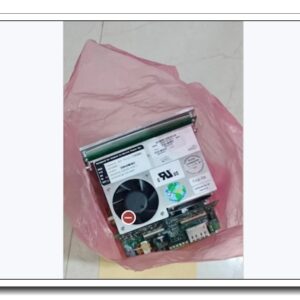
Allen‑Bradley 1783‑ETAP1F, Stratix 5950 Ethernet Tap, 1× Copper & 1× Multimode Fiber Port
Core Product Introduction
The 1783‑ETAP1F is an industrial Ethernet pass‑through tap from Rockwell Automation Stratix 5950 series, designed for non‑intrusive network traffic monitoring on EtherNet/IP and standard TCP/IP industrial networks. It provides a full-duplex mirroring point to copy bidirectional network traffic to monitoring tools such as network analyzers, IDS systems, diagnostic PCs or SCADA capture devices, without altering or interrupting the live control communications. This variant features one RJ45 copper port and one multimode fiber port for the inline link, supporting long-distance fiber runs in control cabinets, plant floors and harsh manufacturing environments. It is widely used for commissioning diagnostics, cyber security auditing, troubleshooting intermittent EtherNet/IP faults and compliance logging for critical ControlLogix, GuardLogix and distributed automation networks. The tap is fully passive for data forwarding; monitored traffic does not impact real-time control performance.
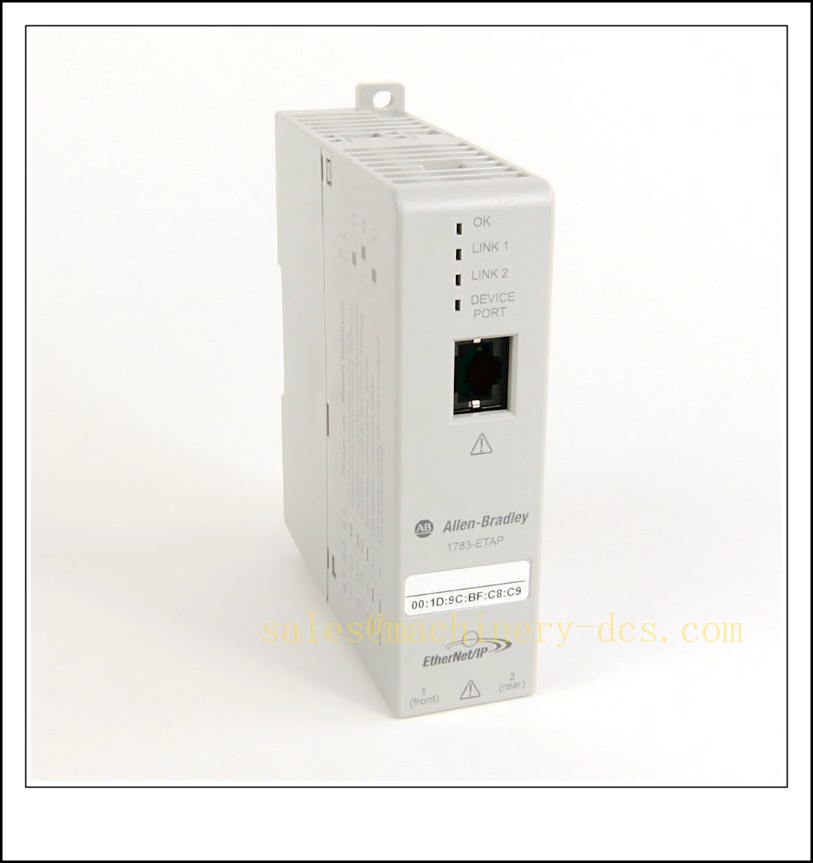
1783-ETAP1F
Main Technical Specifications
| Item | Parameter |
|---|---|
| Catalog Number | 1783-ETAP1F |
| Series | Stratix 5950 Ethernet Tap |
| Inline Ports | 1 × 10/100 Mbps RJ45 Copper, 1 × 100BASE-FX Multimode Fiber (SC connector) |
| Monitor Ports | 2 × 10/100 Mbps RJ45 (Tx / Rx mirror) |
| Operation Mode | Passive inline network tap, full-duplex traffic mirroring |
| Supported Protocols | EtherNet/IP, TCP/IP, UDP, ICMP, all layer‑2 Ethernet frames |
| Fiber Spec | 100BASE-FX multimode, max 2 km |
| Power Supply | 24 V DC (18–30 V DC) |
| Power Consumption | Max 3.6 W |
| Operating Temperature | 0 °C ~ +60 °C |
| Storage Temperature | -40 °C ~ +85 °C |
| Humidity | 5%–95% RH, non-condensing |
| Mounting | DIN rail or panel mount |
| Protection Class | IP20 |
| Status LEDs | Power, Link, Activity per port |
| Certifications | cULus, CE, C-Tick, ATEX Zone 2 |
| Lifecycle Status | Active production |
| Weight | ~0.26 kg |
Quality Control Procedure
- Visual & Label Inspection: Verify original Rockwell / Stratix marking, catalog number 1783-ETAP1F, serial number, SC fiber connector, RJ45 ports, housing with no cracks, pin damage or oxidation.
- Power Supply Test: Apply regulated 24 VDC power, confirm power LED steady on, no excessive heat or abnormal current draw.
- Copper Link Test: Connect 100 Mbps Ethernet link across inline copper port, validate link negotiation and traffic forwarding.
- Fiber Link Test: Pair with compatible 100BASE-FX multimode fiber transceiver; confirm fiber link lock and bidirectional frame transmission.
- Mirror Monitor Port Verification: Generate test Ethernet frames on inline path, verify identical Tx/Rx traffic copies appear on the two monitor ports.
- Full-Duplex Performance Test: Stress with continuous burst traffic; confirm zero packet loss on the inline control path.
- LED Indicator Check: Validate link and activity LEDs toggle correctly with frame transmission.
- Isolation & ESD Check: Confirm ESD protection circuits function per industrial specification.
- Hardware Revision Compatibility Check: Confirm hardware revision compatibility with plant network management workflow.
- Packaging & Traceability: Anti-static packaging, foam cushioning, serial-number linked QC inspection report prior to shipment.
Frequently Asked Questions (FAQ)
Q1: What is the difference between 1783-ETAP1F and 1783-ETAP1?A1: 1783-ETAP1F = mixed copper + multimode fiber inline ports. 1783-ETAP1 is all-copper version (2× RJ45 inline ports). They are not interchangeable for fiber runs.
Q2: Does this tap add latency to the control network?A2: The inline forwarding path is hardware-based with minimal fixed latency. It is designed so control traffic timing is not disturbed for EtherNet/IP CIP I/O motion traffic.
Q3: Can I use this tap for gigabit networks?A3: No, all ports are 10/100 Mbps only. For Gigabit tap, select other Stratix or third-party gigabit tap models.
Q4: What fiber cable does 1783- require?A4: 100BASE-FX multimode fiber with SC connectors. Single-mode fiber will not work on this model.
Q5: Is the tap configurable via software?A5: No, it is a fixed passive mirror tap; no IP address, no web interface, no VLAN filtering. It mirrors all layer‑2 traffic on the inline link.
Q6: Can I hot remove it from a live EtherNet/IP link?A6: Removing the tap breaks the inline network. Plan maintenance window; insert or remove only during approved downtime unless redundant network topology is deployed.
Installation & Configuration Guide
- Pre-install Preparation: Prepare 24 VDC power supply, multimode SC fiber patch cord, CAT5e copper patch cables, network capture PC/analyzer, ESD wristband.
- Network Planning: Identify the single point-to-point Ethernet link to intercept; this tap works for point-to-point links only, not switch trunk spanning ports.
- DIN Rail Mounting: Clip the tap onto standard 35 mm DIN rail inside the control cabinet. Keep clearance for ventilation and fiber bend radius.
- Inline Link Wiring: Cut the existing point-to-point link; one side connects to tap copper inline port, the other side connects to tap fiber inline port via SC fiber cable.
- Monitor Port Connections: Connect your network capture device to the two dedicated monitor RJ45 ports (one for transmit direction, one for receive direction).
- 24 VDC Power Wiring: Apply 24 VDC power and protective earth ground to the tap power terminals.
- Power Up: Energize the tap. Confirm power LED is on, inline link LEDs light up once both inline devices negotiate link.
- Capture Tool Setup: Open Wireshark or approved network diagnostic software on the monitoring PC, capture from the monitor port NICs.
- Traffic Validation: Trigger control traffic, confirm frames are visible on capture tool while original control devices remain communicating normally.
- Documentation: Record tap location, inline device IDs and fiber/cable routing for site network drawings.
Warning: This tap breaks the inline link during insertion. Never insert into safety-critical EtherNet/IP safety loops without approved shutdown or redundant path. Respect minimum fiber bend radius to avoid signal attenuation.
Related Stratix 5950 Tap & Accessory Models & Order Number Recommendation (15 pcs)
| Model | Order Number | Description |
|---|---|---|
| All-Copper Ethernet Tap | 1783-ETAP1 | Stratix 5950 tap, 2 × copper inline ports |
| Dual Fiber Tap | 1783-ETAP2F | Stratix 5950 tap, 2 × 100BASE-FX multimode inline |
| Gigabit Tap | 1783-ETAP3 | Stratix 5950 1Gbps all-copper tap |
| Stratix 5700 Switch | 1783-US08T | 8-port unmanaged industrial Ethernet switch |
| Stratix 5700 Switch | 1783-US16T | 16-port unmanaged industrial Ethernet switch |
| Stratix 5800 Managed Switch | 1783-MS10T | 10-port managed industrial switch |
| SFP Multimode Transceiver | 1783-SFP100FX | 100BASE-FX SFP module |
| SFP Single Mode Transceiver | 1783-SFP100LX | 100BASE-LX single-mode SFP |
| SFP Gigabit Copper | 1783-SFP1GSX | 1000BASE-SX SFP |
| Fiber Patch Cord SC-SC | 1783-FPC02 | 2m multimode SC-SC fiber cable |
| DIN Rail Adapter Kit | 1783-ACC01 | Stratix accessory mounting kit |
| Stratix Network Manager | 1783-NM01 | Network configuration and diagnostic tool license |
| 24VDC Power Adapter | 1783-PWR01 | Replacement power supply for Stratix accessories |
| EtherNet/IP Media Converter | 1783-MCF01 | Copper to fiber 100BASE-FX media converter |
| Tap Cable Kit | 1783-CAB01 | Pre-terminated copper patch cable set for ETAP series |

 Send an Email