
Description
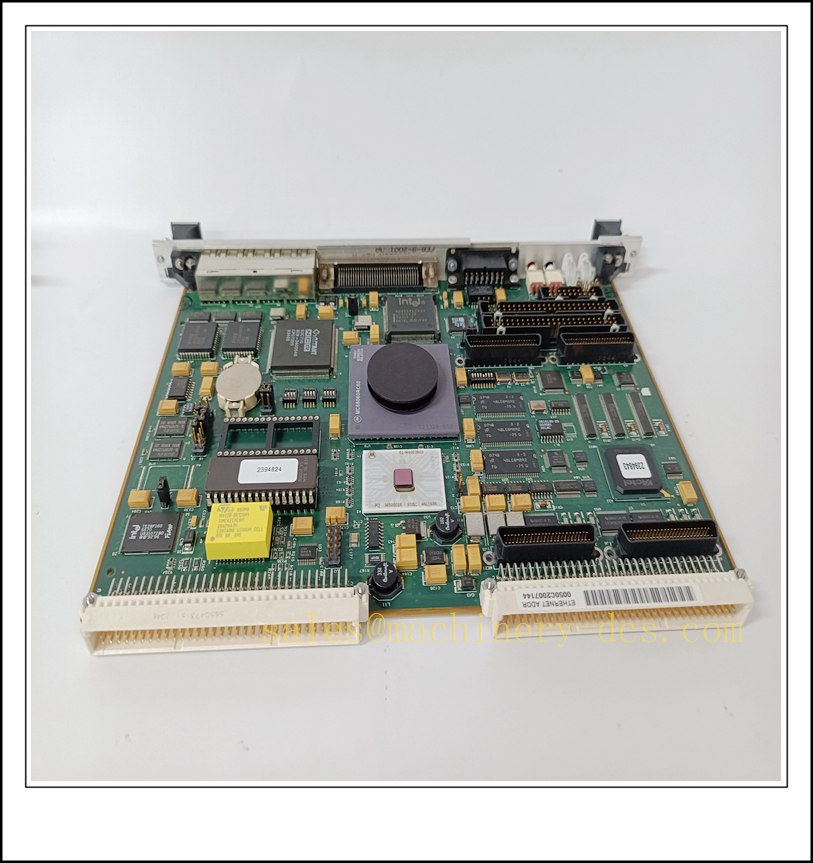
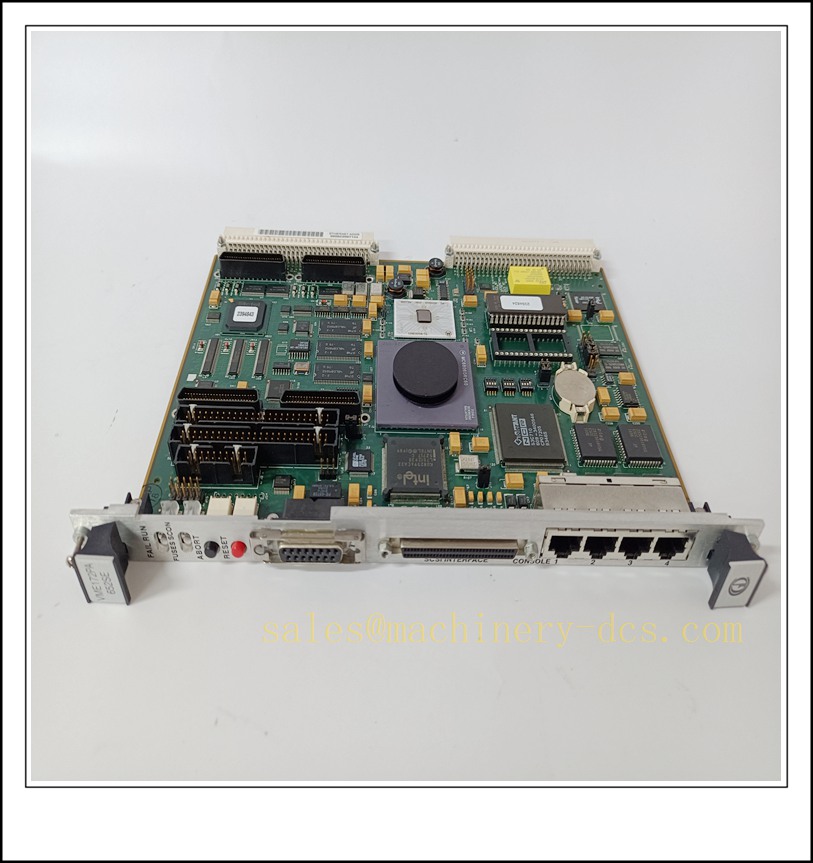
VME162PA-344SE-2G VME Single Board Computer, Industrial Automation Spare Part
Product Core Overview
The VME162PA-344SE-2G is a Motorola / Emerson / Force Computers VMEbus single-board computer (SBC) built for rugged VME embedded control systems. It is a 6U VME CPU board equipped with onboard processor, memory, Ethernet and serial interfaces, serving as the main processing unit for legacy real-time control, simulation, test stands and industrial monitoring systems.This SBC supports real-time operating systems such as VxWorks. It features high reliability, onboard watchdog and comprehensive hardware diagnostics. Widely used in power, rolling stock, defence simulation and large industrial control racks. The VME162PA series is end-of-life, supplied as fully tested spare hardware for existing VME installations to reduce downtime during CPU failure replacement.
VME162PA-344SE-2G
Main Technical Specifications
| Item | Specification |
|---|---|
| Brand | Force Computers (Emerson) |
| Model | VME162PA-344SE-2G |
| Form Factor | 6U VMEbus Single Board Computer |
| Product Type | VME CPU SBC |
| Processor | PowerPC |
| Onboard Memory | 2GB RAM |
| Bus Interface | VMEbus A24/A32, VME master/slave |
| Network | Dual Ethernet ports |
| Serial | RS232 / RS422 serial channels |
| Storage | Onboard Flash for OS and boot image |
| Supply | Powered via VME backplane |
| Operation Temperature | 0 ℃ ~ +70 ℃ (commercial grade) |
| Ambient Humidity | 5%–90% RH, non-condensing |
| Protection Rating | For cabinet / VME rack internal use only |
| Mounting | 6U VME rack slot mounting |
| Diagnostic | Status LEDs for power, heartbeat, Ethernet, fault |
| Safety Features | Hardware watchdog timer, ESD protection, voltage supervision |
| Application | Real-time simulation, test benches, legacy VME control systems, railway & energy control racks |
Quality Control Procedure
- Visual Incoming Inspection: Inspect PCB, front panel connectors, VME gold finger, heat sink, label and serial number integrity.
- ESD Controlled Handling: All inspection and testing performed on grounded anti-static workstation with ESD wrist strap.
- Power-on Burn-in Test: Install on compatible VME backplane, continuous energising for 4 hours; monitor heartbeat LED and temperature.
- Boot & Firmware Test: Verify firmware boot sequence, confirm console output via serial port.
- Memory Test: Run onboard RAM test to verify full 2GB memory bank integrity.
- Interface Functional Test: Validate Ethernet link, serial communication and VME bus master/slave access.
- OS Compatibility Check: Confirm boot image and VxWorks BSP match target system revision.
- Data Archiving: Record serial number and full test report, attach inspection sticker, vacuum anti-static packaging.
- Pre-shipment Audit: Double-check full model suffix, memory variant and quantity before dispatch.
Recommended Related Models & Order Codes (15pcs)
- VME162PA-252SE
- VME162PA-344SE
- -344SE-1G
- VME167-344
- VME172PA-652SE
- VMIVME-7750
- VMIVME-7807
- VMIPMC-5565
- VMIPCI-5565
- VME-5565
- SBS VME64x carrier
- VME1056
- VME-ADIO-16
- VME-DIO-32
- VME power supply 6U
Frequently Asked Questions
Q1: Can -344SE-2G replace -344SE-1G directly?A: Same hardware platform, only RAM capacity differs (2GB vs 1GB). Confirm boot image, software memory allocation and BSP configuration before replacement.
Q2: Is this SBC discontinued?A: Yes, Force Computers series is end-of-life. Stock is original surplus or fully tested refurbished spare parts.
Q3: Can I hot swap this 6U VME CPU while the rack is powered?A: Standard VME is not hot-swap capable. Execute LOTO, power down the VME chassis and wait for bus capacitors to discharge before removal.
Q4: Heartbeat LED stays off after installation, what should I check?A: Check backplane power supply, VME slot contact, boot firmware, serial console debug output and memory fault status.
Q5: Warranty terms?A: Original surplus new: 12-month warranty. Refurbished tested stock: 6-month warranty. Damage caused by ESD, backplane overvoltage, corrupted boot firmware or incompatible BSP is excluded.
Q6: Commissioning & operating system?A: Primarily runs VxWorks with dedicated Force BSP. The boot parameters, network IP and application software must be backed up before replacement.
Installation & Configuration Guide
Pre-installation Preparation
- Confirm rack environment: clean, low dust, no condensation, away from high EMI sources.
- Prepare ESD protection, insulated screwdriver, serial console cable, Ethernet cable and system boot configuration backup.
- Record boot parameters, IP address and application version before removing the faulty SBC.
Installation Steps
- Execute LOTO lockout-tagout procedure, shut down the VME chassis main power supply.
- Disconnect Ethernet and serial cables from the front panel, remove retention screws, extract the faulty board vertically.
- Unpack new spare under ESD protection; avoid touching VME gold fingers and PCB components.
- Align the board with the VME slot guides, insert evenly and fasten front panel screws.
- Reconnect serial console cable and Ethernet cable as per the original wiring.
- Check backplane grounding and chassis PE connection.
Configuration & Commissioning
- Restore chassis power and observe heartbeat LED status.
- Connect serial terminal to the console port, monitor boot loader startup messages.
- Verify boot parameters, MAC/IP address and boot device settings match the original configuration.
- Load the validated VxWorks OS and user application.
- Test VME bus communication with other slave boards, Ethernet network and serial links.
- Run memory and peripheral self-test; confirm no hardware exceptions.
- Restore the control / simulation application and validate system behaviour.
- Save boot parameters and complete commissioning log.
Maintenance Notes
- Keep heat sink and rack airflow channels free of dust; overheating causes boot crash or watchdog reset.
- Do not touch gold fingers; contamination leads to intermittent VME communication faults.
- Do not erase onboard flash without backup.
- Store spare SBC in dry sealed anti-static packaging.

 Send an Email