
Description
Product Title
ProSoft MVI56E-MNETC – Modbus TCP/IP Multi Client Enhanced Network Interface Module for Rockwell ControlLogix
Core Product Introduction
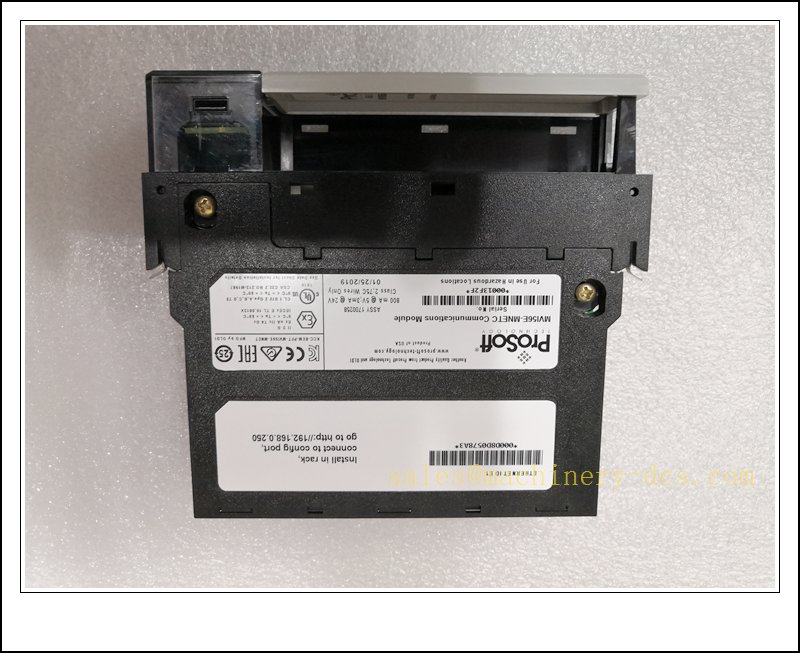
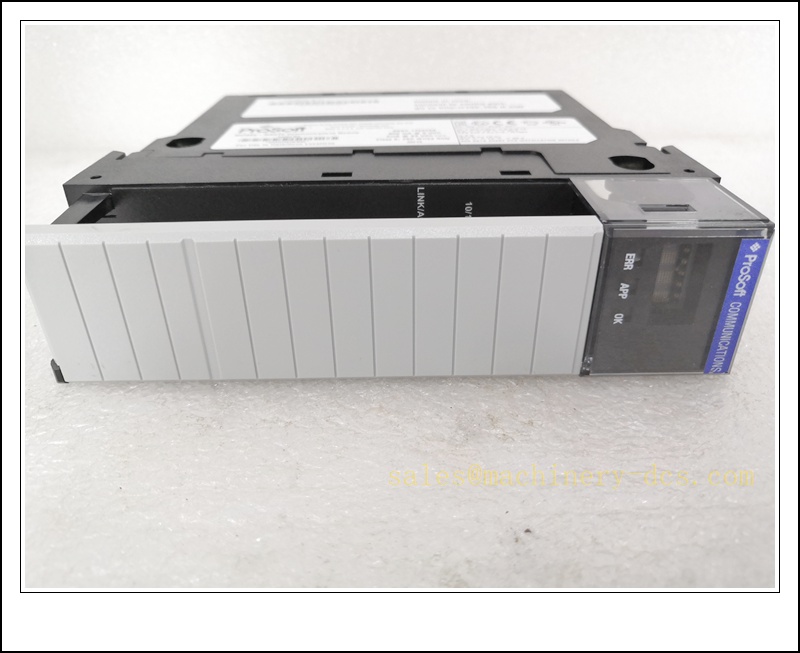
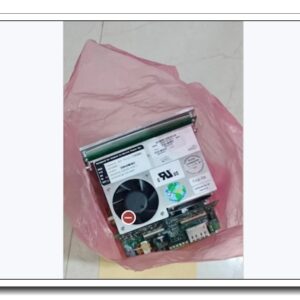
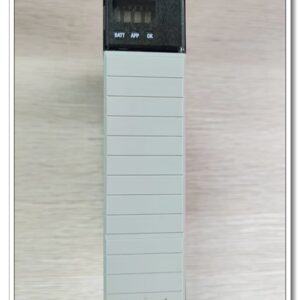
The MVI56E-MNETC is a single-slot enhanced communication interface module developed by ProSoft Technology for the Rockwell 1756 ControlLogix backplane chassis. It enables seamless bi-directional data exchange between ControlLogix PAC and a large variety of Modbus TCP/IP server devices such as flow transmitters, VFDs, remote RTUs, Modicon PLCs, meters and DCS nodes. This multi-client variant supports up to 30 Modbus TCP client connections and concurrent server operation, acting as a high-performance data concentrator for process automation, water & wastewater, oil & gas, power and manufacturing systems. It features dual 10/100 Mbps auto-sensing Ethernet ports, on-board scrolling alphanumeric diagnostic display, CF personality card for quick configuration backup/recovery, CIPconnect remote diagnostics and native Add-On Instruction (AOI) support for RSLogix 5000. Backward compatible with legacy MVI56-MNETC for spare replacement and system migration projects.
MVI56E-MNETC
Main Technical Specifications
| Item | Parameter |
|---|---|
| Model | MVI56E-MNETC |
| Platform | Rockwell 1756 ControlLogix Chassis, single slot |
| Protocol | Modbus TCP/IP (Client + Server simultaneous) |
| Max Client Connections | 30 Modbus TCP client sessions |
| Max Server Connections | Up to 40 server connections |
| Ethernet Ports | 2 × 10/100 Base-T RJ45, auto MDI/MDIX |
| Data Register Mapping | Up to 10,000 × 16-bit user-defined registers |
| Configuration Tool | ProSoft Configuration Builder (PCB) |
| Diagnostics | 4-character scrolling LED display, web server, CIPconnect |
| Storage Media | CompactFlash Personality Module for config backup |
| Backplane Current Draw | 800 mA @ 5 VDC; 3 mA @ 24 VDC |
| Operating Temperature | 0 °C ~ +60 °C |
| Storage Temperature | -40 °C ~ +85 °C |
| Relative Humidity | 5%–95% RH, non-condensing |
| Shock | 30 g operational; 50 g non-operational |
| Vibration | 5 g, 10 Hz to 150 Hz |
| Certifications | cULus Class I Div.2, ATEX II 3G Ex nA IIC T6, CE |
| Status | Active production, widely used for new build & spares |
| Weight | ~0.28 kg |
Quality Control Procedure
- Visual & Label Inspection: Verify original ProSoft marking, MVI56E-MNETC part number, serial number, chassis connector pins, Ethernet ports and CF slot without damage, oxidation or burn marks.
- Backplane Power Test: Mount module on ControlLogix backplane; confirm OK LED status, no overheating or abnormal current draw.
- Display & LED Functional Test: Validate scrolling diagnostic display, APP, OK and status indicator sequence during boot-up.
- Ethernet Port Test: Test both RJ45 ports for link, activity, auto-crossover and IP assignment via ProSoft Discovery Service (PDS).
- CF Personality Card Test: Load configuration file onto CF card, verify automatic config restore after power cycle.
- Modbus Communication Bench Test: Establish client connection to Modbus TCP simulator, validate read/write register accuracy and connection stability.
- ControlLogix Backplane Data Exchange Test: Import AOI into RSLogix5000, validate cyclic data transfer between controller and module.
- Fault Simulation Test: Simulate network disconnection, IP conflict and slave timeout to confirm diagnostic flags and alarm reporting.
- Firmware & Compatibility Check: Confirm factory firmware revision and compatibility with RSLogix 5000 / ControlLogix firmware versions.
- Packaging & Traceability: Anti-static bag, static foam protection, serial-number linked QC report before shipment.
Frequently Asked Questions (FAQ)
Q1: What is the difference between MVI56E-MNETC and MVI56E-MNET?A1: MVI56E-MNETC is the multi-client optimized version with higher concurrent client session capacity; MVI56E-MNET is the standard client/server model with lower connection limits. They are not pin-for-pin interchangeable without project reconfiguration.
Q2: What is MVI56E-MNETCXT?A2: MVI56E-MNETCXT is the extreme-temperature conformal-coated variant for XT Logix chassis, designed for -25 °C ~ +70 °C harsh environments.
Q3: Can I use this module with CompactLogix?A3: No, it is 1756 ControlLogix backplane form factor only. CompactLogix requires different ProSoft communication modules.
Q4: What software do I need to configure ?A4: ProSoft Configuration Builder (PCB) for network and Modbus mapping setup; RSLogix 5000 / Studio5000 with provided AOI for backplane data handling.
Q5: What is the Personality CF card used for?A5: It stores the full module configuration. Swap the CF card into a replacement module for fast restoration without re-programming.
Q6: Does it support Modbus RTU?A6: No, native protocol is Modbus TCP/IP. Use MVI56E-MCM series for Modbus RTU/ASCII serial communication.
Installation & Configuration Guide
- Pre-install Preparation: Confirm 1756 ControlLogix chassis and power supply, shielded CAT5e Ethernet cables, ProSoft PCB software, Studio5000/RSLogix5000, ESD wristband.
- Chassis Slot Selection: Power down the ControlLogix rack. Insert into an empty 1756 backplane slot and lock the module latch.
- Ethernet Wiring: Connect Ethernet port E1 for configuration/diagnostics; E2 for Modbus TCP field network. Separate control network and field Modbus network for security.
- Power Up & Discovery: Apply chassis power. Use ProSoft Discovery Service (PDS) to locate the module and assign static IP address.
- PCB Configuration Launch: Open ProSoft Configuration Builder, create project for , define Modbus TCP server devices, register mapping, polling intervals and timeout settings.
- AOI Import in Studio5000: Import the official Add-On Instruction into ControlLogix program, map input/output tags between controller and module backplane data blocks.
- Download Configuration: Download PCB configuration file to the module, save the same configuration onto the CF personality card for backup.
- Communication Commissioning: Verify client connections to all Modbus TCP slave devices; check register read/write, timeout and fault status on module display or web diagnostic page.
- Tuning & Optimization: Adjust poll delay and request pacing to avoid network congestion on busy Modbus TCP networks.
- Final Backup & Documentation: Save PCB project, Logix program, module firmware revision and CF backup file for site maintenance.
Warning: Avoid mixing safety I/O network with Modbus TCP field network. Always use static IP addresses for fixed field devices.
Related ProSoft ControlLogix Models & Order Number Recommendation (15 pcs)
| Model | Order Number | Description |
|---|---|---|
| MVI56E-MNETCXT | MVI56E-MNETCXT | Modbus TCP Multi Client, extreme temp coated version |
| MVI56E-MNET | MVI56E-MNET | Standard Modbus TCP Client/Server Module |
| MVI56E-MNETCR | MVI56E-MNETCR | Modbus TCP Multi Client, reduced data block for remote rack |
| MVI56E-MCM | MVI56E-MCM | Modbus RTU/ASCII Master/Slave Serial Module |
| MVI56E-MCMXT | MVI56E-MCMXT | MCM extreme temperature conformal coated variant |
| MVI56E-SIE | MVI56E-SIE | Siemens S7 Ethernet ISO-on-TCP Module |
| MVI56E-DNPNET | MVI56E-DNPNET | DeviceNet to EtherNet/IP Gateway |
| MVI56E-ASCII | MVI56E-ASCII | ASCII Serial Communication Module |
| MVI56E-104S | MVI56E-104S | IEC 60870-5-104 Server Module |
| MVI56E-PNIO | MVI56E-PNIO | PROFINET IO Slave Interface Module |
| MVI56E-GSC | MVI56E-GSC | Generic Serial ASCII Gateway Module |
| MVI56-MNETC | MVI56-MNETC | Legacy non-enhanced Modbus TCP Multi Client |
| MVI56E-FLN | MVI56E-FLN | FL-Net Communication Module |
| MVI56E-HART | MVI56E-HART | HART Multiplexer Interface Module |
| Personality CF Card | MVI56E-CF | Replacement CompactFlash config card for MVI56E series |

 Send an Email