
Description
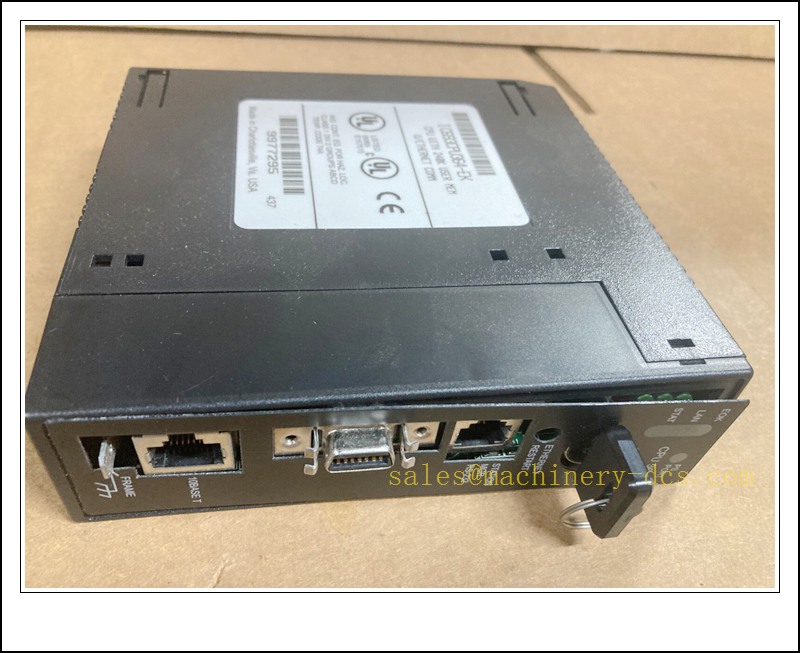
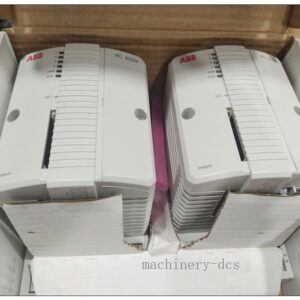
IC693CPU364 GE Fanuc Series 90-30 PLC CPU Module, Integrated 10BASE-T Ethernet & RS232 Port
Technical Specifications
- Part Number: IC693CPU364
- Platform: GE Fanuc Series 90-30 PLC
- Processor: 80386EX, 25 MHz
- User Memory: 240 KB configurable memory
- Logic Scan Speed: 0.22 ms per 1K Boolean contacts
- Max I/O Capacity: 2048 discrete inputs / 2048 discrete outputs
- Communication Ports:
- Embedded 10 Mbps 10BASE-T Ethernet (EGD, Ethernet Global Data)
- RS232 DB15 serial port (SNP / SNP-X protocol for programming)
- System Expansion: Supports up to 8 baseplates (CPU base + 7 expansion/remote baseplates)
- +5VDC Current Draw: 1.1 A
- Operating Ambient Temperature: 0 °C ~ +60 °C
- Storage Temperature: -40 °C ~ +85 °C
- Humidity: 5% – 95% non-condensing
- Ethernet Fuse: 1 A, 125 V slow-blow replaceable fuse
- Programming Software: LogicMaster 90 (LM90)
- Form Factor: Single-slot CPU module
IC693CPU364
Key Features & Advantages
- All-in-one single-slot high-performance CPU with native Ethernet, saving an extra communication slot on the backplane.
- Supports Ethernet Global Data (EGD) for fast peer-to-peer PLC data exchange and HMI networking.
- Built-in RS232 SNP port for direct local programming, commissioning and troubleshooting.
- Configurable memory allocation for logic, registers, analog and discrete data to match application requirements.
- Floating-point arithmetic supported for advanced process and motion control calculations.
- Rich diagnostic LED indicators (RUN, STAT, LAN, OK) for quick fault identification.
- Fully compatible with the entire Series 90-30 I/O, power supply and accessory ecosystem.
- Rugged industrial design, stable operation for continuous long-cycle production environments.
- Widely stocked legacy replacement part to minimize downtime for existing 90-30 installed bases.
Model Parameters
| Item | Parameter |
|---|---|
| Catalog No. | IC693CPU364 |
| Product Type | PLC Central Processing Unit |
| Series | Series 90-30 |
| Mounting | Standard 90-30 backplane single slot |
| Network | 10BASE-T Ethernet + RS232 Serial |
| Max Baseplates | 8 |
| Compatible Power Supplies | IC693PWR321, IC693PWR322, IC693PWR330, IC693PWR331 |
| Status Indicators | RUN, STAT, LAN, OK |
| Certification | Industrial control standard compliance |
| Condition | Original / Refurbished spare for legacy system |
Application Fields
- Petrochemical and refining process control
- Water & wastewater treatment automation
- Power plant auxiliary control systems
- Material handling, packaging and conveyor lines
- HVAC and building central control
- Automotive assembly machinery
- Food & beverage production lines
- Tunnel, pump station and remote skid control
- Legacy GE Fanuc 90-30 system retrofit & replacement projects
Related Product Recommendations
- IC693CPU363
- IC693CPU374
- IC693PWR321
- IC693PWR330
- IC693CMM321
- IC693ALG220
- IC693ALG221
- IC693MDL645
- IC693MDL740
- IC693CHS391
Installation & Maintenance
Installation Instructions
- Cut off all rack power before installation and confirm full electrical isolation.
- Inspect the module front panel, connector pins and PCB for damage, corrosion or bent pins.
- Insert the CPU vertically into the selected backplane slot, seat firmly and lock the retaining clip.
- Confirm the compatible power supply revision; non-compliant power units may cause unstable operation.
- Wire Ethernet and RS232 cables correctly. Use shielded twisted pair for Ethernet, max 100 m for 10BASE-T.
- Restore power, download user project via LM90, verify I/O configuration and perform run-mode test.
- Record IP address, firmware version and fault history for future site reference.
Maintenance Guidelines
- Keep the cabinet dry, dust-free and away from corrosive vapors or liquid splashing.
- Perform quarterly visual inspection of LED status, connector tightness and signs of overheating.
- Static protection (anti-static wrist strap) is mandatory whenever removing or handling the CPU.
- Clean only with dry anti-static cloth; avoid strong solvents or compressed air directed at circuit boards.
- If Ethernet communication fails, first check the internal replaceable Ethernet fuse and cable continuity.
- Store backup copies of the LM90 logic offline; CPU memory loss may occur after power cycle or fault reset.
- Do not open the module housing or attempt internal repair; unauthorized disassembly voids warranty.
- Replace the unit promptly when recurring major faults cannot be cleared via fault table reset.

 Send an Email