
Description
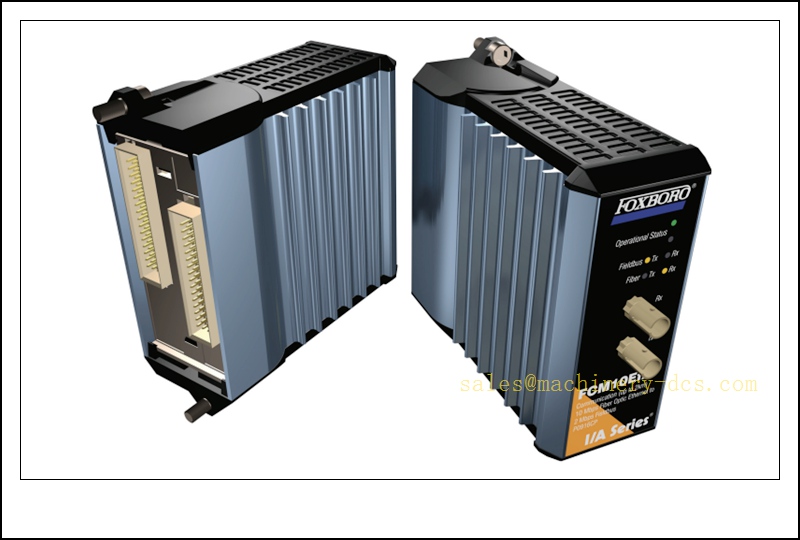
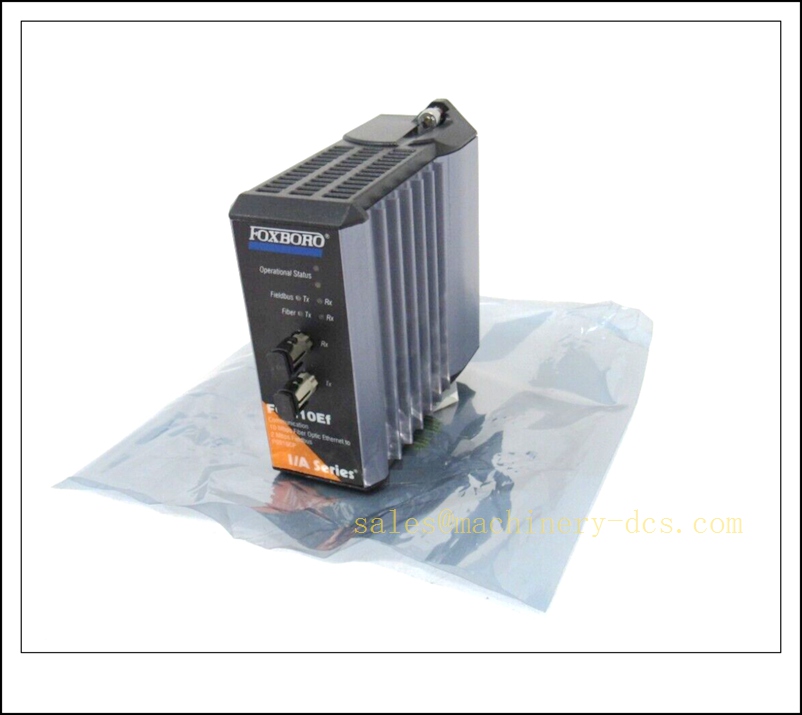
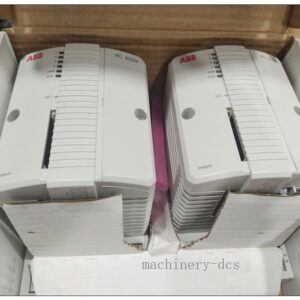
Foxboro P0916CP, FCM10EF Fiber Communication Module, Modulebus to 10Base-FL Ethernet Bridge for I/A Series 200
Core Product Introduction
The P0916CP, marked as FCM10EF, is a fiber-optic communication bridge module for the Foxboro I/A Series 200 DCS platform. It converts the proprietary 2 Mbps Modulebus (HDLC) to 10 Mbps 10Base-FL fiber Ethernet. It extends remote FBM I/O racks over multimode fiber, provides full galvanic isolation and eliminates ground loop risks between the host control rack and distributed field I/O racks. Widely deployed in refineries, chemical plants, power stations and offshore process systems for long-distance remote I/O expansion. It supports hot swap and redundant 24 VDC power supply, mostly supplied as spare parts for legacy I/A Series systems.
P0916CP
Main Technical Specifications
| Item | Parameter |
|---|---|
| Part Number | P0916CP (FCM10EF) |
| Manufacturer | Foxboro (Schneider Electric) |
| Platform | I/A Series 200 DCS |
| Function | Modulebus to 10Base-FL fiber bridge |
| Modulebus Rate | 2 Mbps HDLC |
| Fiber Ethernet | 10 Mbps 10Base-FL, ST connector, multimode fiber |
| Max Fiber Distance | Up to 2000 m |
| Power Supply | 24 VDC, redundant supply supported |
| Power Consumption | 7 W max |
| Isolation | 1500 Vrms optical isolation |
| Hot Swap | Supported |
| Operating Temperature | -20 °C ~ +70 °C (ISA G3 harsh environment) |
| Storage Temperature | -40 °C ~ +85 °C |
| Humidity | 5%–95% RH, non-condensing |
| Mounting | I/A 200 series backplane slot mount |
| Weight | ~0.3 kg |
| Certifications | CE, UL |
| Lifecycle Status | EOL, spare stock only |
Quality Control Procedure
- Visual & Label Inspection: Verify original Foxboro marking, part number P0916CP / FCM10EF, serial number, ST fiber port, backplane gold fingers; no pin damage, scratches or corrosion.
- 24VDC Power Boot Test: Apply 24 VDC power, confirm power LED and self-test, no abnormal heating or overcurrent.
- Modulebus Backplane Communication Test: Install on test backplane, verify handshake with FCP and FBM modules on Modulebus.
- 10Base-FL Fiber Link Test: Connect multimode ST fiber, establish 10Mbps fiber link, check link status LED.
- Protocol Conversion Test: Verify bidirectional transparent data forwarding between 2Mbps Modulebus and fiber Ethernet.
- Isolation Resistance Test: Confirm high isolation between Modulebus side and fiber network side.
- Node Capacity Test: Verify communication stability with multiple FBM nodes on the remote segment.
- Fault Alarm Test: Simulate fiber break and Modulebus loss, check correct diagnostic alarms.
- Firmware Compatibility Check: Confirm firmware revision matches customer I/A system baseline.
- Packaging & Traceability: Anti-static packaging, foam protection, serial-number QC report before shipment.
Frequently Asked Questions (FAQ)
Q1: What is FCM10EF?A1: FCM10EF is the module model name; P0916CP is the Foxboro catalog part number, they refer to the same hardware.
Q2: What fiber type and connector does it use?A2: Multimode fiber, ST connector, 10Base-FL. Single-mode fiber cannot be used directly.
Q3: How many FBM modules can one support?A3: Up to 32 FBM nodes per Modulebus segment; up to 128 nodes with additional expansion hubs.
Q4: Can it be hot swapped while the rack is online?A4: Yes, hot swap is supported. However, the remote FBM segment will lose communication temporarily during replacement, so MOC and bypass procedures are required.
Q5: What is the difference between (P0916CP) and FCM10E?A5: FCM10E uses copper Ethernet; () uses fiber for long-distance, noise-resistant installation.
Q6: Can it work with I/A Series Evo?A6: No, it belongs to the older I/A Series 200 architecture, not compatible with I/A Evo native bus.
Installation & Configuration Guide
- Pre-install Preparation: I/A 200 backplane, redundant 24VDC supply, multimode ST fiber cable, Foxboro I/A engineering station.
- Slot Installation: Power off or follow hot-swap procedure, insert into designated FCM slot and lock.
- Power Wiring: Connect primary and redundant 24VDC power, protective earth.
- Fiber Wiring: Insert ST fiber into port, confirm Tx/Rx direction; clean fiber end face before connection.
- Power Up: Energize power, check power and link LEDs.
- I/A System Scan: From I/A engineering workstation, perform hardware scan, confirm is recognized.
- Remote I/O Segment Configuration: Configure remote FBM addresses, baud rate and bus parameters.
- Communication Verification: Check real-time tag data from remote FBM modules.
- Fiber Fault Test: Disconnect fiber temporarily to verify loss-of-link alarm.
- Backup: Save I/A database, bus configuration and firmware version to plant archive.
Warning: Fiber ports are laser-based. Do not look directly into the ST fiber port. This module extends control bus, fiber damage will cause all remote FBM I/O loss.
Related Foxboro I/A Series 200 Models & Accessories (15 pcs)
| Model | Order Number | Description |
|---|---|---|
| Copper Modulebus Bridge | P0916CN (FCM10E) | FCM10E copper Ethernet bridge |
| FCP270 Controller | P0917YZ | I/A Series field control processor |
| FBM201 DI Module | P0916AA | 16-channel digital input FBM |
| FBM202 TC Input | P0916AC | 8-channel thermocouple input FBM |
| FBM204 4-20mA AI | P0916AE | Analog input FBM |
| FBM207 Contact Input | P0916AG | Contact sense input module |
| FBM214 AO Module | P0916AH | Analog output FBM |
| FBM232 Profibus | P0916AP | Profibus gateway FBM |
| ST Multimode Fiber Patch Cord | FOX-CAB-ST-002 | 2m ST fiber jumper |
| I/A Backplane | P0904HA | 8-slot I/A 200 backplane |
| Redundant Power Supply | P0903CW | 24VDC rack power supply |
| FBM Termination Assembly | P0916CC | FBM terminal base |
| FCM Diagnostic Cable | P0909DB | FCM service debug cable |
| Replacement Housing | -KIT-CASE | Spare housing kit |
| I/A Series Engineering Software | IA-SERIES-WS | I/A operator & config workstation software |

 Send an Email