
Description
Allen‑Bradley 5069-L4100ERMW CompactLogix 5480 Controller | Industrial Automation Spare Part
Product Brief Introduction
The Allen‑Bradley 5069-L4100ERMW is a high-performance CompactLogix 5480 controller from Rockwell Automation, built for mid-range discrete, motion, and process automation applications. It integrates rich embedded networking, real-time motion control, and cybersecurity functions within the Compact 5000 I/O ecosystem. Equipped with dual Ethernet ports supporting DLR, this controller delivers deterministic EtherNet/IP communication, high-speed tag access, and integrated web server capability. It is widely deployed in packaging machinery, material handling, water treatment, food & beverage, and general manufacturing, offering flexible scaling, simplified system architecture, and robust runtime reliability for 24/7 production environments.
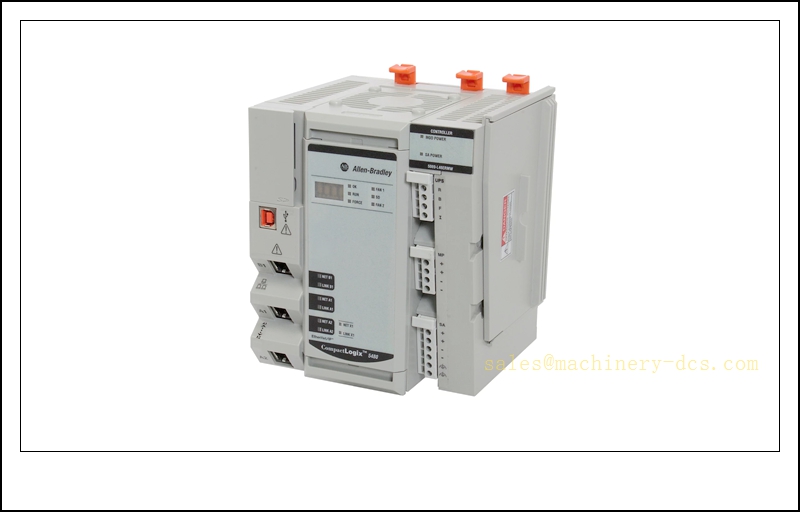
5069-L4100ERMW
Key Technical Specifications
- Brand: Allen‑Bradley (Rockwell Automation)
- Catalog Number: 5069-L4100ERMW
- Product Family: CompactLogix 5480
- Memory: 10 MB application memory
- Embedded Ports: Dual Ethernet (EtherNet/IP), USB port
- Network Support: EtherNet/IP, DLR (Device Level Ring), CIP Security
- Motion Control: Integrated CIP Motion support
- Task Scheduling: Deterministic real-time task execution
- Operating Temperature: 0 °C ~ +60 °C
- Storage Temperature: -40 °C ~ +85 °C
- Relative Humidity: 5% – 95%, non-condensing
- Mounting: DIN rail mounting
- EMC Compliance: IEC 61000 series
- Programming Software: Studio 5000 Logix Designer
- Security: CIP Security, role-based access control, firmware signature validation
- Hot Swap: Compatible with hot‑swappable Compact 5000 I/O modules (controller itself is not hot-swappable)
- Certification: UL, CSA, CE
Quality Control Procedure
- Visual & Label Inspection: Examine housing, connectors, terminal blocks and laser marking for scratches, deformation or oxidation.
- Hardware Revision Verification: Confirm valid official catalog revision.
- Power‑on Initial Test: Apply rated power and verify power LED and status indicators.
- Communication Interface Test: Establish EtherNet/IP connection with Studio 5000, validate upload/download of project.
- Logic Execution Test: Run sample control logic to verify scan performance and tag read/write stability.
- Burn‑in Screening: Continuous energized aging under rated temperature to eliminate early failures.
- EMC Immunity Test: Simulate industrial electromagnetic noise conditions.
- Firmware Validation: Confirm correct, stable firmware version as requested.
- Serial Number & Test Record Archiving: Log SN, firmware revision and test results for traceability.
- ESD Protected Packing: Anti‑static shielding bag plus shock‑absorbent foam before shipment.
Frequently Asked Questions (FAQ)
Q1: What software do I use to program the 5069-L4100ERMW?A1: Studio 5000 Logix Designer is the official programming and configuration software.
Q2: Can the controller be replaced online without shutting down the machine?A2: No. The CompactLogix 5480 controller itself cannot be hot swapped. System power removal is required for controller replacement.
Q3: What I/O series is this controller matched with?A3: It works with Compact 5000 series I/O modules (5069‑xx series). It is not backward compatible with older CompactLogix 1769 I/O.
Q4: What is DLR function used for?A4: Device Level Ring provides ring topology for EtherNet/IP networks. A single cable break will not interrupt communication.
Q5: Does it support motion control?A5: Yes, it supports CIP Motion over EtherNet/IP for drives and servo axes.
Q6: What is the standard warranty?A6: 12 months warranty after delivery. Extended warranty can be quoted separately.
Q7: Is the controller ESD sensitive?A7: Yes. ESD wrist strap and anti-static working area are required during handling.
Installation & Configuration Guide
- Pre‑Installation Preparation
- Execute lockout-tagout (LOTO) procedure for machine power; obtain work permit.
- Prepare ESD wrist strap, insulated screwdriver, Studio 5000 software, backup project file and network drawing.
- Inspect the new 5069-L4100ERMW for physical damage and confirm catalog number.
- Remove the Existing Controller
- Confirm all controlled equipment is in safe idle state.
- Disconnect Ethernet cables and USB cable from the old controller.
- Release DIN rail latch and slide the controller upward to detach.
- Put the faulty unit into an ESD shielding bag.
- Mount the New Controller
- Maintain ESD protection throughout the operation.
- Clip the new controller onto the DIN rail and lock the latch securely.
- Reconnect Ethernet cables, USB and 24VDC power wiring according to schematic.
- Power Up & Hardware Recognition
- Double-check wiring to rule out short circuit or reversed polarity.
- Apply 24VDC power. Observe LED indicators: solid green = healthy; flashing/red = fault.
- Connect Studio 5000 via Ethernet or USB, browse the network to discover the controller.
- Match the project firmware revision with the controller firmware; upgrade/downgrade if necessary.
- Project Download & Validation
- Open the validated backup project in Studio 5000.
- Download the project to the controller after confirming safety interlocks.
- Verify I/O tags, communication connections, axis configuration and safety routines.
- Test manual control sequences and motion axes one by one.
- Post‑Installation Handover
- Clear fault logs, record serial number, firmware version and replacement time in maintenance records.
- Run full functional acceptance test of the machine.
- Restore equipment to normal operation mode and inform operation team.
Important Reminder: Any project download or logic modification must follow site MOC (Management of Change) procedure and machine safety validation.
Related Allen‑Bradley Models & Part Number Recommendations (15 pcs)
- 5069-L4100ERMW CompactLogix 5480 Controller
- 5069-L3100ER CompactLogix 5380 Controller
- 5069-L3200ER CompactLogix 5380 Controller
- 5069-L3300ER CompactLogix 5380 Controller
- 5069-IB16 Digital Input Module
- 5069-OB16 Digital Output Module
- 5069-IF8 Analog Input Module
- 5069-OF8 Analog Output Module
- 5069-ARM Address Reserve Module
- 5069-AENTR EtherNet/IP Adapter
- 5069-BP Compact 5000 Backplane
- 5069-P24 24VDC Power Supply
- 5069-RTB5-SCREW Terminal Block
- 1783-ETAP EtherNet/IP Tap
- 1756-L81E ControlLogix Controller

 Send an Email